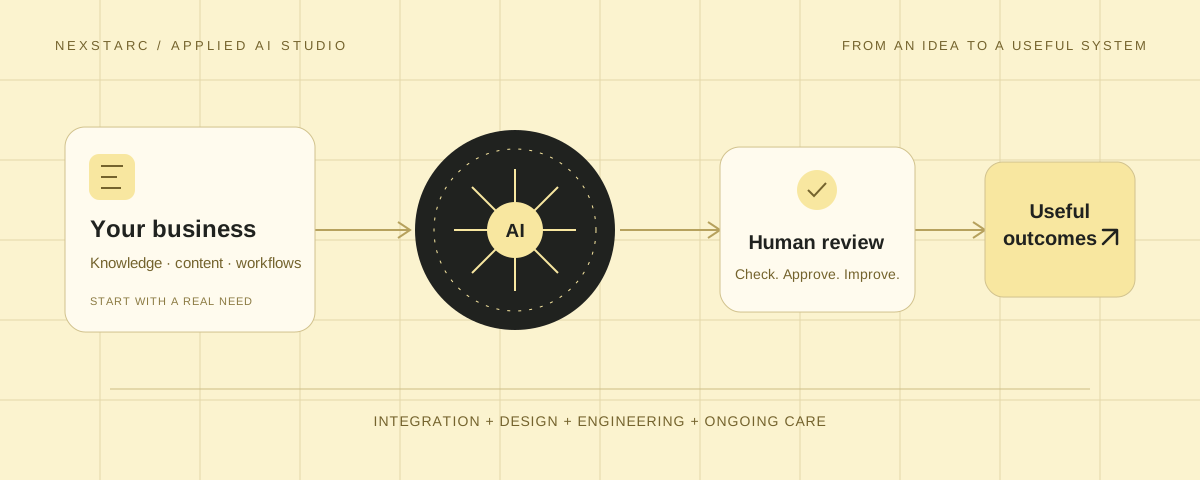
An AI assistant can write an answer. Making that answer useful inside a real business takes more work: the right information, a clear task, a reliable connection to your systems, and a person who remains accountable for the result. That is where an applied AI studio comes in.
At Nexstarc, we connect website development, business systems and applied AI. The starting point is the work your visitors or team need to do. We then decide whether AI can help, how it should fit, and what must stay under human control.
What is an applied AI studio?
An applied AI studio is a team that puts AI to work in products, websites and everyday processes. It might build a search experience that understands customer questions, help staff find information in approved documents, or connect an enquiry form to a workflow that prepares a useful first response.
The word applied matters. The goal is not to add AI to every screen. It is to identify a problem, build a suitable solution, and check whether the result improves the experience. Sometimes a clearer page, a better form or a straightforward automation is the better answer.
A useful studio brings several disciplines together: understanding the business, designing the interaction, integrating the technology, testing the behaviour and supporting it after launch.
What does an applied AI studio actually do?
The work usually starts before a model or tool is chosen. We look at what people are trying to accomplish, where they lose time, and which information the business can safely make available.
- Find a worthwhile use case. Define one task and what a good result would look like.
- Prepare the information. Identify reliable content, product data or business records, and the permissions needed to access them.
- Build the experience. Design the interface and connect AI to the website or workflow.
- Test the difficult cases. Check incomplete questions, missing information, poor answers and failed connections.
- Keep it working. Review results, refresh information and adjust the feature as the business changes.
A working demo is one step in that process. A production feature also needs access controls, clear failure behaviour, appropriate review steps and an explanation your team can use.
Why does applied AI matter now?
AI tools make it easier to explore ideas, draft content and prototype features. The harder question is how to make those capabilities dependable within a business that already has customers, systems and established ways of working.
A team might produce a good answer in a chat window but still copy information manually between its website, inbox and CRM. An applied approach connects those steps. It asks where AI belongs in the workflow, what it is allowed to do, and how the team will know whether it is helping.
Useful AI starts with a clear job, reliable information and a way to check the result.
The principle behind our applied AI work
This matters when your business wants to move beyond experiments. The aim is a repeatable process that people understand—not a feature that only its creator knows how to operate. Benefits depend on the use case, implementation and ongoing care; they should be measured rather than assumed.
Where can you use applied AI?
The right use case is usually close to a question people ask repeatedly or a task they perform often. These are examples of what a project could support, rather than features every business needs.
Help visitors find a relevant service, understand a policy or reach the right person, using approved business content.
Improve product discovery and suggest relevant products using your catalogue, with availability and pricing handled by reliable store data.
Summarise documents, classify enquiries or prepare draft responses so staff can review and act with better context.
Prepare page drafts, organise information and support routine updates through a controlled review process.
For example, an assistant could answer a delivery question from your published policy. A request to change an order would need a different level of permission and verification. Answering a question and taking an action should be designed as separate responsibilities.
How does an applied AI project work?
A focused first release is easier to evaluate than a wide automation that changes everything at once. We work through the problem in manageable steps.
- Define the task. Choose the user, the situation and the outcome. “Help staff classify incoming enquiries” is a clearer brief than “put AI in our business.”
- Review the existing setup. Check the website, data, integrations and technical limits before deciding what to build.
- Build a small working version. Connect approved information to an interface or workflow your team can try.
- Review real examples. Test normal requests and awkward cases. Measure useful outcomes such as accepted drafts, successful searches or time spent correcting answers.
- Launch with clear boundaries. Set permissions, human approval points, fallback behaviour and an agreed support plan.
How Nexstarc applies AI to websites and business systems
Our AI services bring together implementation, improvement and ongoing support. We help you choose the right starting point for the problem you have.
AI features inside your website
Our AI integration work includes search, site assistants, recommendations and content workflows. These features use your business information and fit the website’s design. We define what the feature can answer, how it handles uncertainty and when it should direct someone to your team.
AI-assisted content and operational workflows
We can help connect tasks such as enquiry sorting, draft replies, content tagging and document summaries. The implementation depends on your systems and data. Important decisions and outgoing actions can remain subject to human approval.
Search visibility and AI-assisted SEO
AI search visibility focuses on making your business information clear and accessible to search and answer systems. AI-assisted SEO supports research and technical review for conventional search. Neither service can guarantee rankings or inclusion in an AI answer.
Cleanup and ongoing care
A website built with AI tools still needs sound engineering. Our AI cleanup and support work addresses broken functionality, maintainability and the parts that need human attention. After launch, we can agree a scope for reviews, updates and improvements.
Can AI integrate with a system you already use?
Often, yes. You do not necessarily need a new website or a replacement business platform. The first step is to understand how the existing system works and what connections it supports.
Nexstarc works with WordPress, WooCommerce, Shopify, Odoo and custom websites. Depending on the project, integration can use an existing API, a webhook, an approved data export or a small custom service. We assess the platform, code and access requirements before recommending an approach.
Consider an existing enquiry workflow:
Website enquiry → AI-prepared summary → suggested category → staff review → approved next step in the CRM.
A proposed workflow, not a claim about an existing client implementation. The available steps depend on your software, permissions and business rules.
The form and CRM can stay in place. AI supports a specific part of the work between them. Before building, we agree which fields are accessible, where data is processed, what happens if the connection fails, and who can approve or correct the result.
If a system lacks a reliable integration point, or its underlying code needs repair, we will explain that first. Adding AI should not make an unstable setup harder to maintain.
How does Nexstarc CMS use AI?
Nexstarc CMS connects your AI client to your website, so you can describe what you want and work on the actual site from the conversation. Create pages, write blog posts, adjust layouts, update content and prepare changes for publishing—all through the supported tools and permissions of your connection.
Connect. Describe. Make it happen.
Your AI helps do the work. You choose the publishing route.
-
01Connect your AI
Connect a supported AI client to Nexstarc CMS. Set the access it needs for your website.
-
02Describe the website
Ask for a new page, a blog article or a design change. Your AI prepares it on your website.
-
03Review or publish
Review the preview first, or ask your AI to publish the approved work directly when publishing access is enabled.
AI prepares the draft. The owner reviews and publishes in the CMS.
With publishing access and your confirmation, AI publishes from the chat—without a separate admin review.
One conversation for the work your website needs
Use AI across the website tasks Nexstarc CMS supports. You can ask it to create a landing page, improve existing copy, change a page layout, update links and images, organise blog content, or inspect page metadata and structure. Enabled tools can also support forms, shared navigation and other website features.
- Build and update pages. Describe the purpose, content and look you need, then refine the result in preview.
- Write and publish blogs. Ask for an article with a title, introduction, sections, image and CTA. Review it and, with direct publishing enabled, tell your AI to publish it from the same conversation.
- Keep the design consistent. Work with reusable page layouts and shared headers and footers, rather than recreating the website for every update.
- Improve the details. Ask for clearer headings, page descriptions, internal links and image alt text, then check the changes on the built page.
The important difference is that your AI can prepare the real website change, not just suggest text or code for you to copy elsewhere. You can discuss the result, adjust it, and choose when it goes live.
Direct publishing is optional. Connections without that permission prepare work for owner review. Publishing creates a restore point, while supported visual editing remains available when you prefer to change text, links or images yourself. Access is limited to the CMS features and permissions enabled for your connection; it is not unrestricted control of your hosting or every external business system.
Why this approach matters for your next website update
Businesses need to keep websites current without turning every change into a separate technical project. AI can help prepare the work, but speed is only useful when the result is accurate, consistent and easy to review.
Nexstarc CMS brings drafting and website management into the same workflow. You can see what is changing, check the actual page, and decide when it is ready. That makes AI assistance more practical for the work after launch: a new service, a revised offer, a fresh article or an updated customer question.
The same principle applies to a wider integration project. Start with one useful task. Keep trusted systems in place where they work. Give the AI the information and access it needs, and give your team a clear way to review the result.
Ready to put AI to work in your business?
Tell us what your team repeats, what your customers struggle to find, or what you want your website to do better. We will review the setup and discuss whether an AI feature, an integration or a simpler improvement is the right next step.