Arrange an online meeting

Quick summaryNexstarc CMS

Nexstarc CMS is a content management system built so an AI agent can operate it. Your agent builds and edits your site as plain HTML files. You preview every change and approve it before it goes live. It installs on ordinary web hosting.

How it works

  • Install your server. Upload one folder to your hosting and open the setup page. It checks your server and connects the database.
  • Sign up. Create your owner account in the last step of the installer.
  • Connect your AI. Create a connection and paste one command into Claude, Codex or Cursor.
  • Work with your AI agent. Describe what you want in plain words. The agent writes the pages, checks speed and SEO, and sends you a draft to preview and approve.

Why it is different

  • The AI proposes, a person approves. Every change is a draft first, and a restore point is saved before every publish.
  • Fast by default. Visitors get plain HTML files, with no database or PHP on page views.
  • Yours to own. It runs on your hosting with your domain and your files.

Who it is for

  • Agencies and freelancers. Let your AI build and update client sites while the client approves each change.
  • Business owners. Get a fast site you can update by asking. Nothing changes without your say-so.

Good to know

  • Ordinary hosting is enough. PHP 8.1 or newer, MySQL, MariaDB or SQLite, and Apache-style hosting with .htaccess.
  • Not supported yet. Online shops with checkout, member logins and custom web apps.
  • Private beta. Early-access pricing is agreed with each team.

What is inside

  • 48 AI tools for pages, files, audits, previews, forms, booking, blog and more.
  • Approval workflow with backups and one-click rollback.
  • Import existing sites and keep the design byte for byte.
  • Blog with categories, tags, an RSS feed and share buttons with no tracking.
  • Comments and ratings that you approve first.
  • Online booking with live availability and double-booking protection.
  • Forms and inbox with spam protection and email alerts to you.
  • Users and roles: owner, editor and viewer.
  • Password protection while you build.
  • SEO, AEO and AI visibility facts for every page.

Common questions

What is Nexstarc CMS?

It is a content management system built so an AI agent can operate it. Your agent builds and edits the site as plain HTML files. You preview every change and approve it before it goes live.

Do I need technical skills?

No developer is needed to get started. You upload one folder, run a guided installer, then paste one command into your AI app. After that you work in plain words. Our studio can also install and manage it for you.

Which AI can I use?

Any AI app that supports the open MCP standard, such as Claude, Codex and Cursor. You connect it once, and you can use more than one.

Can the AI publish without my approval?

Not unless you allow it. By default the AI can only stage drafts, and you approve each change in the admin. Publishing rights are a switch on each AI connection, and every publish is backed up.

What can it not do yet?

Online shops with checkout, member logins and custom web apps are not supported, and sites exported from frameworks such as Next.js need to be exported as plain HTML first.

A short summary of this page. Switch to Full page to read it all.hello@nexstarc.comRequest early access

Nexstarc CMS

Build your website by talking to your AI. You approve every change.

Nexstarc CMS is a content management system your AI agent can run. It writes fast, plain HTML pages, you preview and approve them, and nothing goes live without you. It installs on ordinary web hosting.
  • Works with Claude, Codex and Cursor
  • Runs on your own hosting
  • Every change backed up
cms.yourdomain.com/review
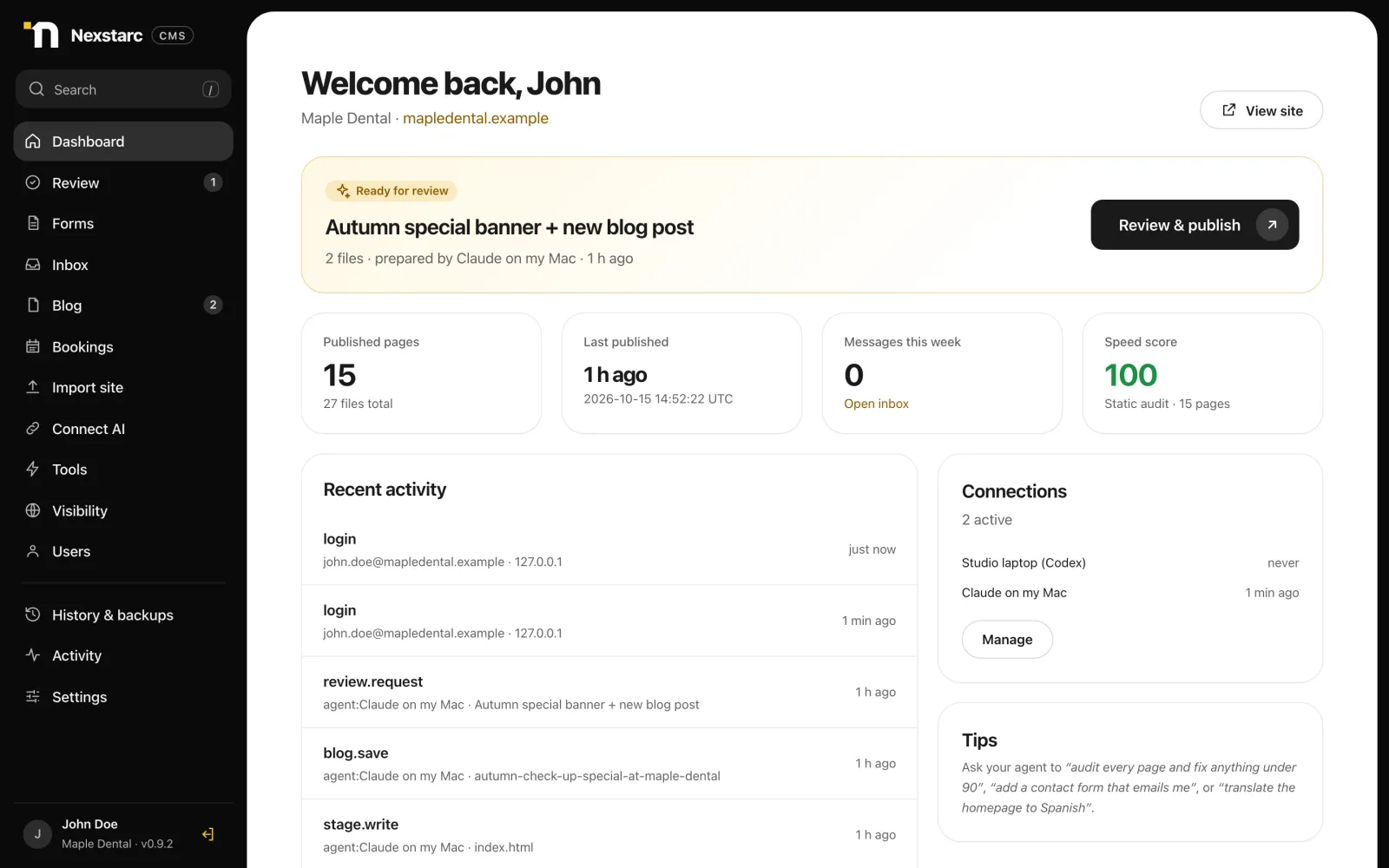
The Nexstarc CMS dashboard showing a change from the AI agent ready for review, published pages and a speed score of 100
You asked your AI“Add an October offer badge to the home page and write a blog post about it.”
100Draft ready.
Speed & SEO audit
Built for teams who want AI speed with a human in charge
Static HTML pagesApproval before publishBackups & rollbackImport existing sites unchanged
Yours from end to end

Your AI agent. Your data.
Your server.

Choose the AI you work with. Keep your website files and CMS records on hosting you control. You decide what changes and when it goes live.

Your AI agent

Connect Claude, Codex, Cursor or another compatible MCP client. Use your own AI account to request changes, then preview and approve the draft.

Your data

Your pages, images, posts, form submissions and booking records live on your hosting. Keep access to your files and database, with backups before every publish.

Your server

Install Nexstarc CMS on compatible PHP hosting, under your own domain. Publish plain HTML pages and keep the freedom to move your website to another host.

Your website is self-hosted. Content you share with your connected AI agent is also processed by that AI provider under its own terms and settings.

How it works

From install to your first page in four steps

No developer needed to get going. If you can upload a folder and copy a command, you can run it.

  1. 1Install your server
  2. 2Sign up
  3. 3Connect your AI
  4. 4Work with your AI agent
01

Install your server

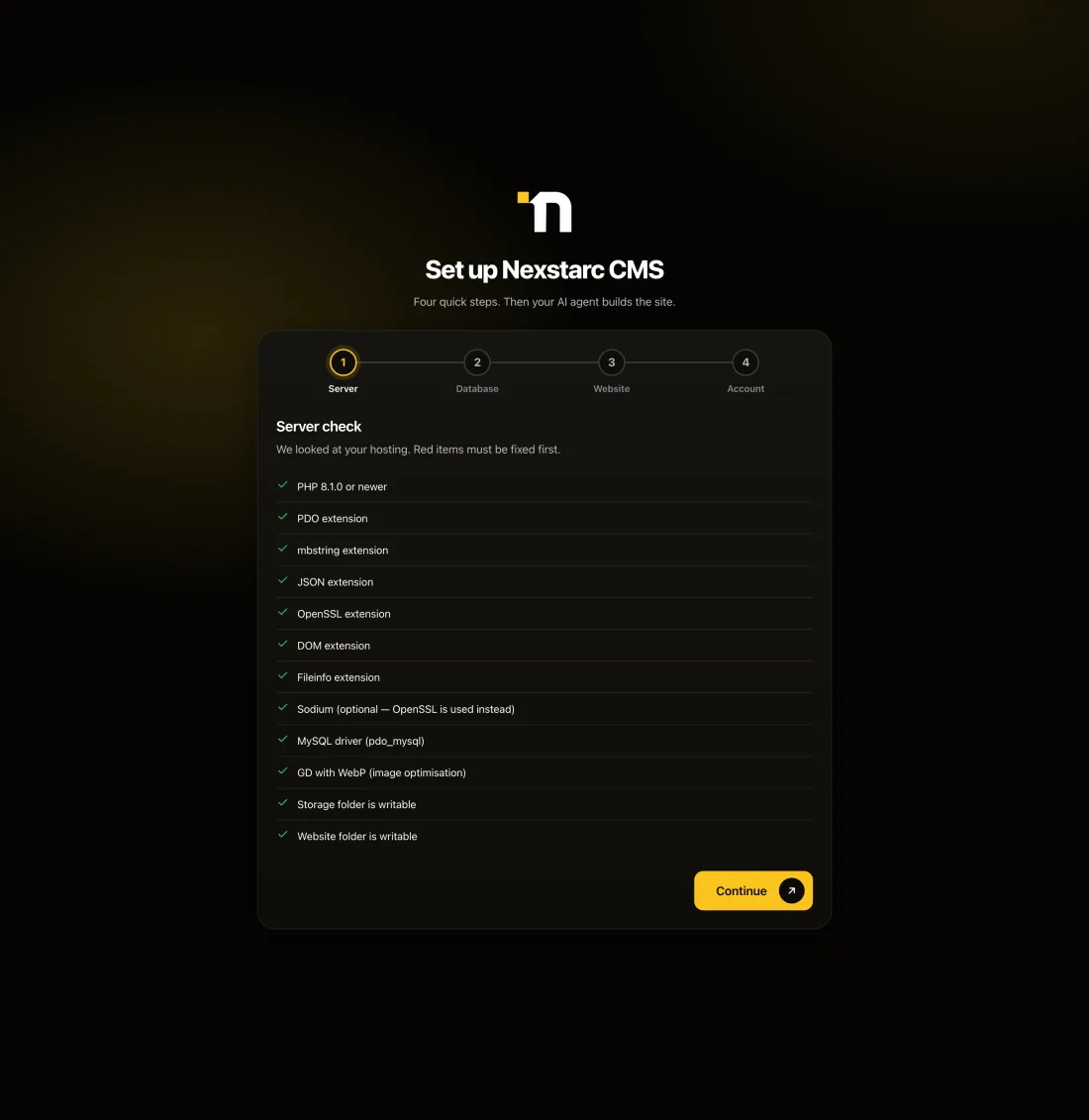
Upload one folder to your hosting and open the setup page. It checks your server, connects the database and prepares the site folder for you.
  • Works on ordinary PHP hosting (MySQL, MariaDB or SQLite)
  • A guided four-step installer with a live “Test connection”
  • Your site, your files, your hosting. No lock-in.
The Nexstarc CMS installer showing a server check with every requirement passed
02

Sign up

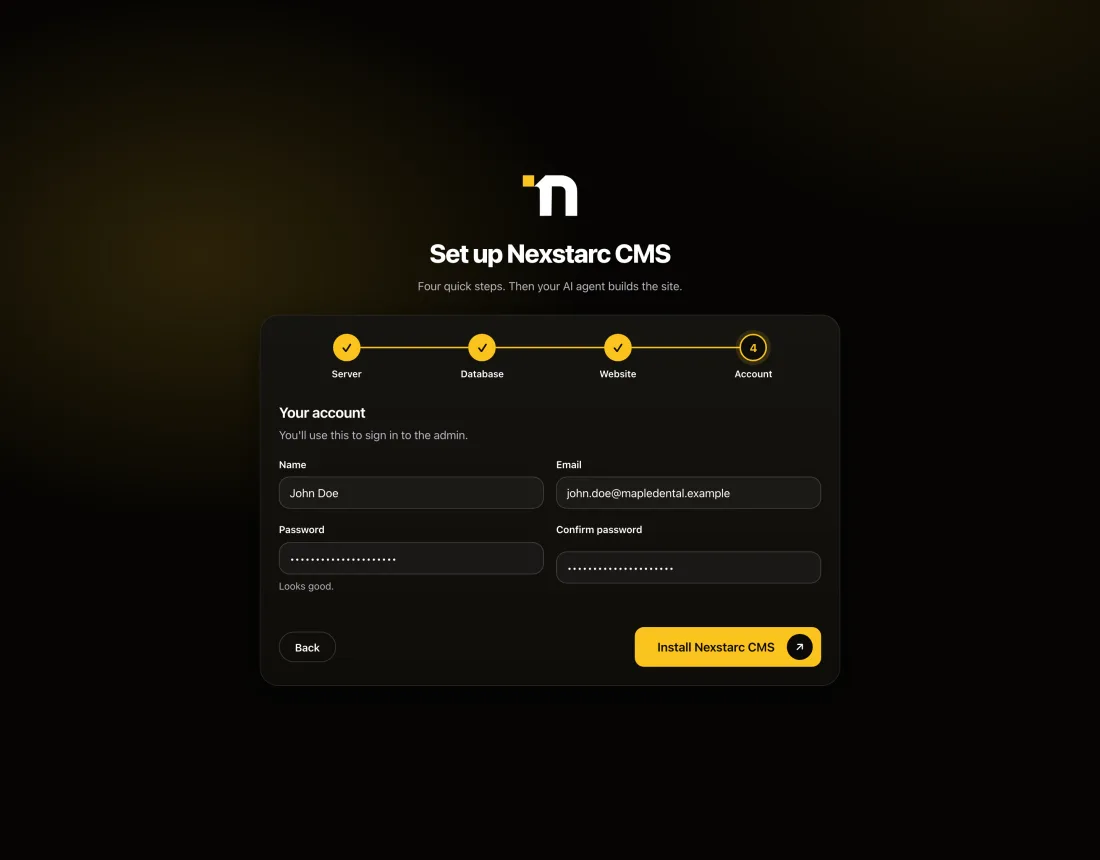
Create your owner account in the last step of the installer. That is your login to the admin where you approve everything.
  • Add editors and viewers later, each with the right level of access
  • Strong passwords and sign-in protection built in
  • Every action is recorded in an activity log
The installer's account step with name, email and password fields and an Install button
03

Connect your AI

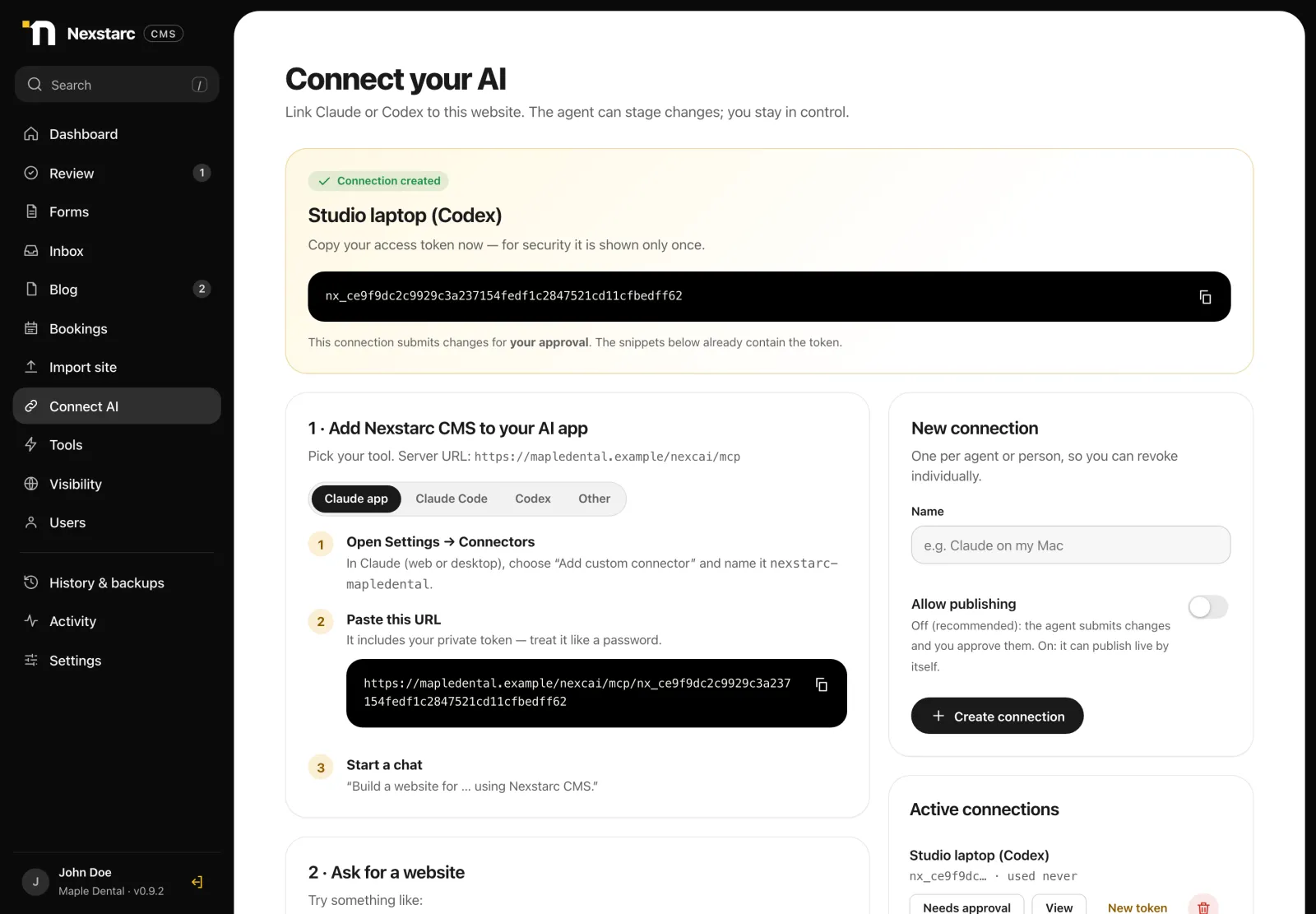
Create a connection and paste one command into Claude, Codex or Cursor. Your AI can now see the site and stage changes. You decide whether it may ever publish on its own. By default it cannot.
  • Ready-made commands for each AI app
  • Revoke or replace a connection in one click
  • One connection per person or agent, so you always know who did what
The Connect your AI screen with an access key and setup commands for Claude, Codex and other tools
04

Work with your AI agent

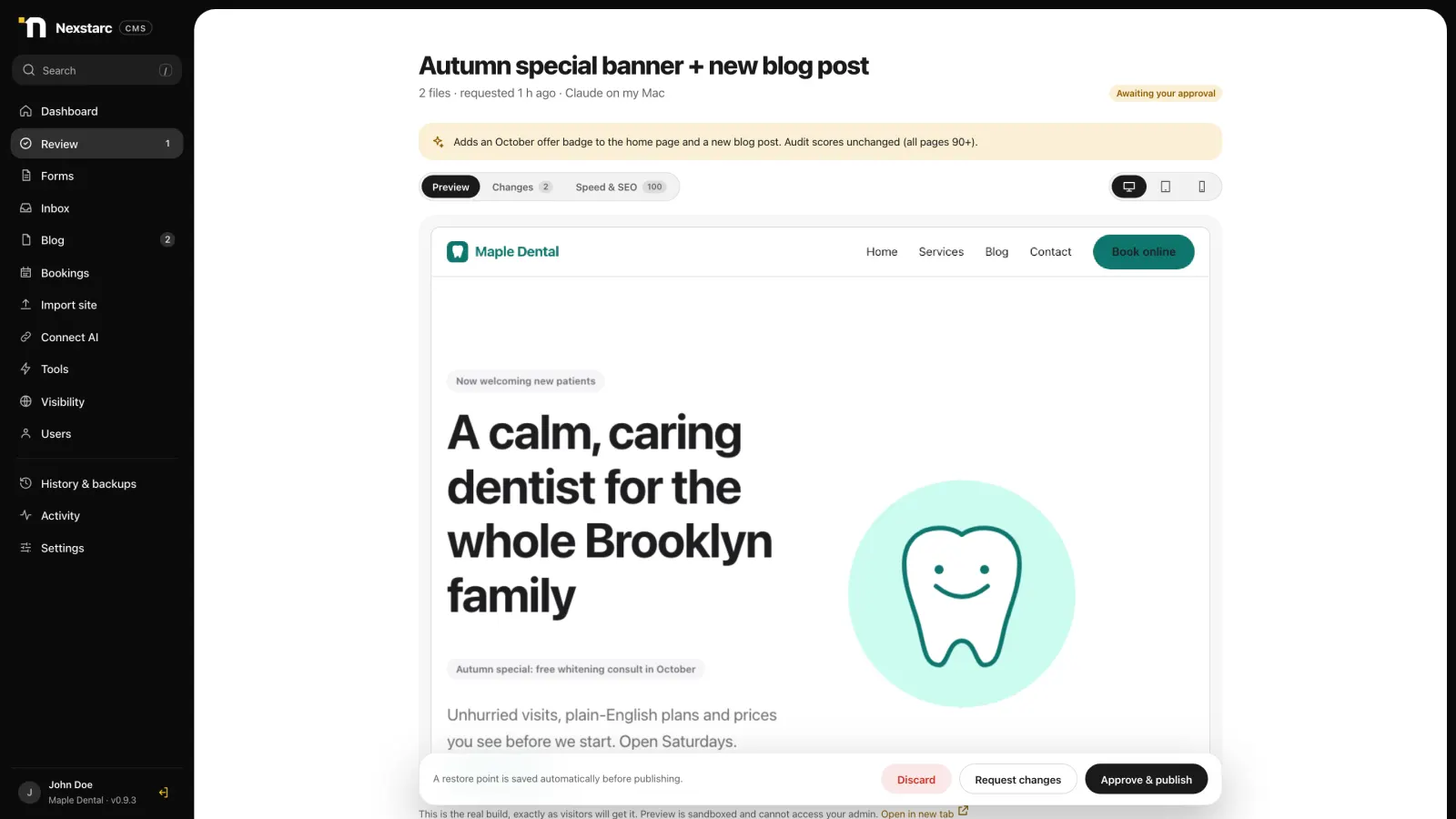
Describe what you want in plain words. The agent writes the pages, checks speed and SEO, and sends you a draft. You preview it, approve it, and it goes live. Ask again whenever you want a change.
  • “Build a 5-page site for my clinic with online booking”
  • “Add a blog post about whitening and link it from the home page”
  • “Connect the contact form so messages reach my inbox”
The review screen previewing a draft website before the owner approves it
Why it is different

AI does the work. You keep the keys.

Most tools that let AI touch your website either cannot be trusted to change it or cannot be stopped from breaking it. Nexstarc CMS was designed around a simple rule: the AI proposes, a person approves.

You stay in control

Every change is a draft first. You see exactly what changed, preview it, then approve. A restore point is saved before every publish, so you can roll back.

Fast by default

Visitors get plain HTML files, with no database or PHP on page views. The built-in audit scores every page for speed and SEO before you publish.

Yours to own

It runs on your hosting with your domain and your files. Nothing is trapped in a platform, and your AI is the one you already use.

What is inside

Everything a business site needs, managed by your AI

48 AI tools

Pages, files, audits, previews, forms, booking, blog and more, all open to your agent.

Approval workflow

Draft, preview, approve, publish, with backups and one-click rollback.

Import existing sites

Bring in a site made elsewhere and keep its design byte for byte.

Blog with categories

Posts, category and tag pages, RSS feed, and share buttons with no tracking.

Comments and ratings

Visitors comment and rate in one step. You approve each comment first.

Online booking

Services, opening hours and live availability, with double-booking protection.

Forms and inbox

Contact forms with spam protection, an inbox, and email alerts to you.

Users and roles

Owner, editor and viewer roles. Everyone picks their own theme: Studio, dark or light.

Password protection

Keep the site private while you build, like a store password page.

Backups and rollback

A restore point before every publish. Undo any change in a click.

SEO, AEO and AI visibility

Plain facts for every page, plus a ready prompt your AI uses to check it and draft the fixes.

Your domain, your host

No platform fees on your visitors. Move hosts any time.

See the product

Real screens from a demo clinic website, managed end to end through Nexstarc CMS.

Select a tab to switch between screens.
Dashboard with a change ready for review, published pages, speed score and recent activity
Dashboard. A change from your AI is waiting for review. Speed score, activity and connections at a glance.
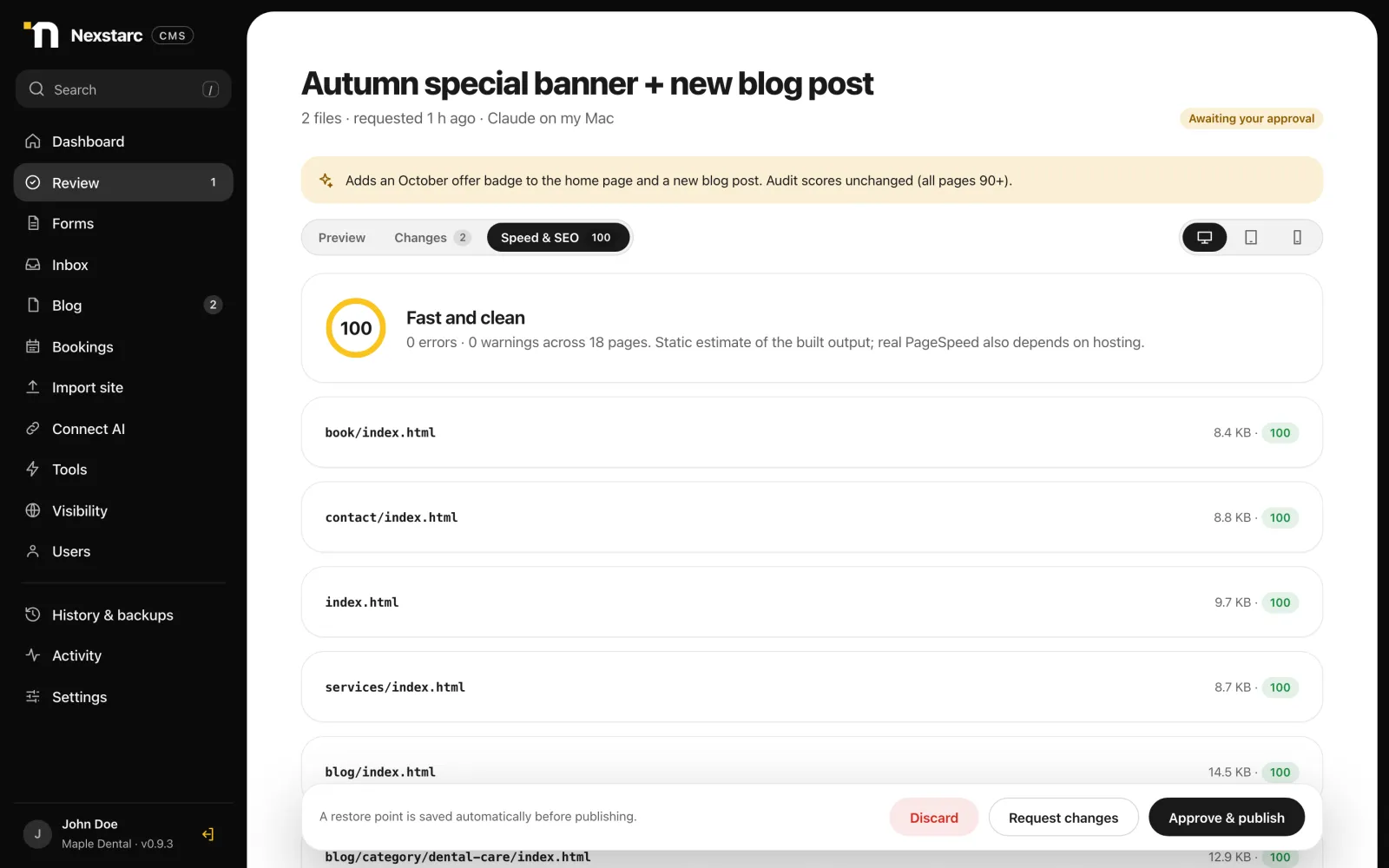
Speed and SEO audit with a score of 100 per page
Review and approve. See what changed, preview it on desktop, tablet and mobile, check the speed and SEO score, then approve or ask for changes.
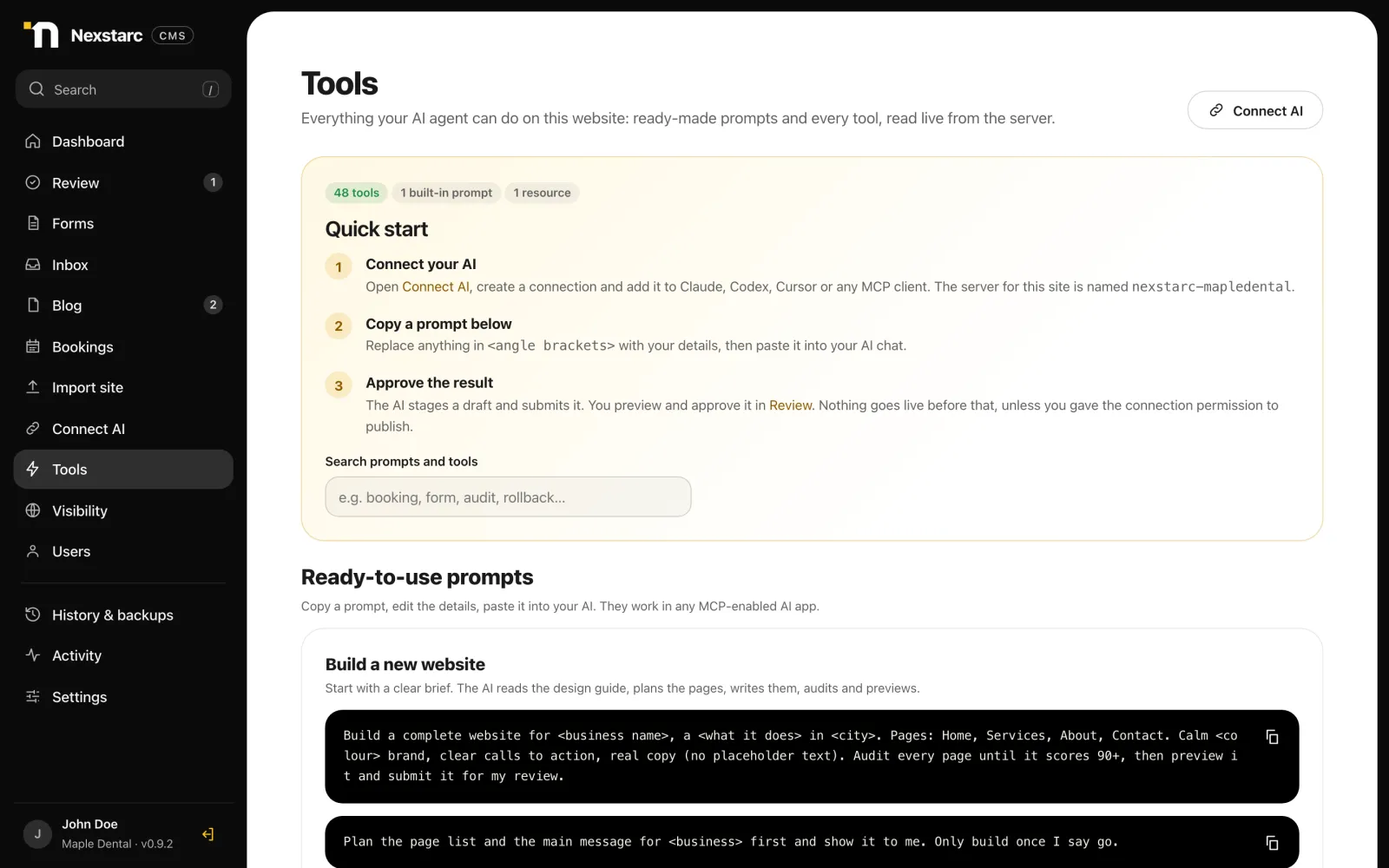
Tools page listing ready-made prompts and every tool the AI can use
AI tools and prompts. Copy a ready-made prompt, or browse every tool your AI can use, read live from the server.
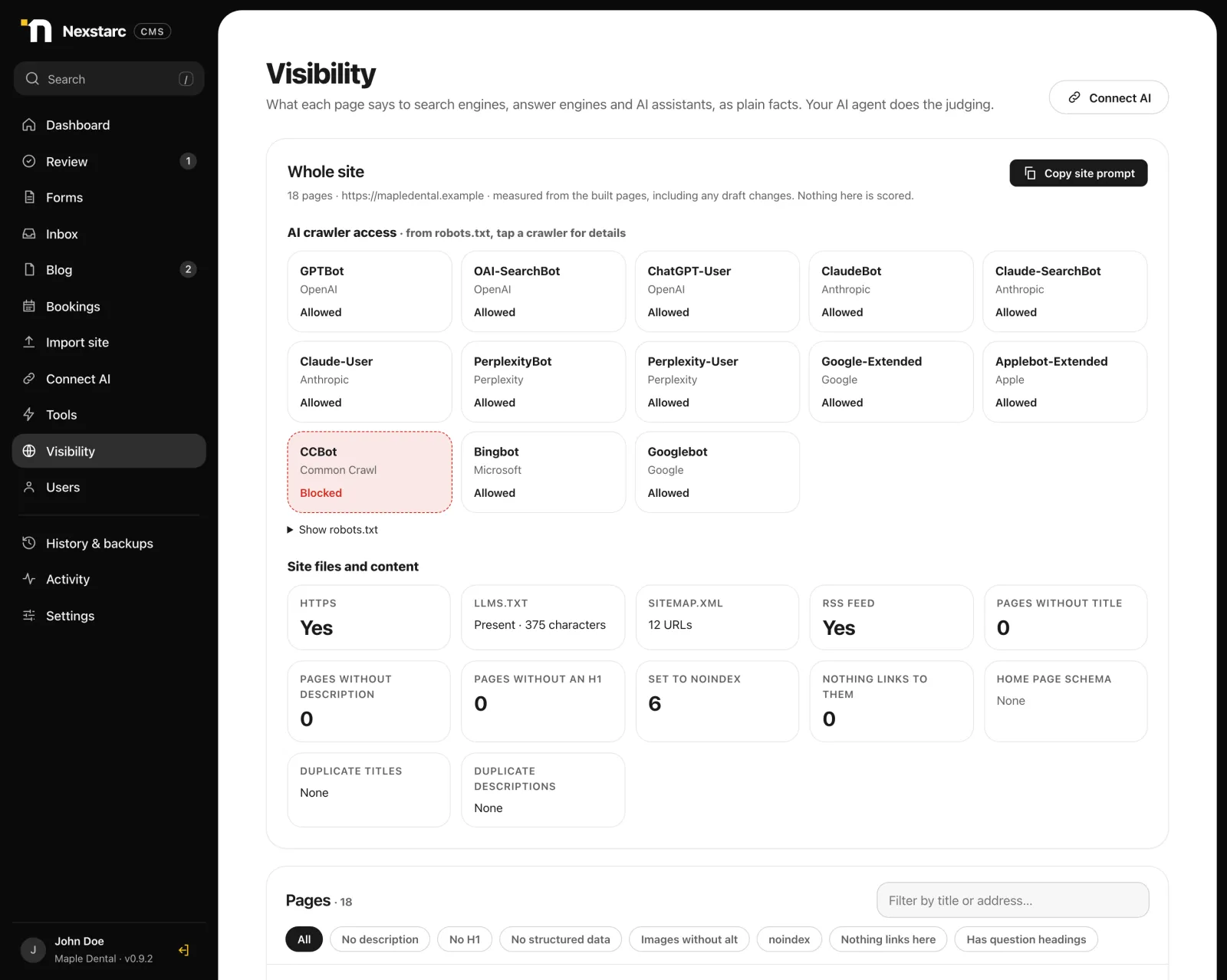
Visibility screen showing which AI crawlers robots.txt allows, llms.txt, sitemap and content facts
Visibility. See which AI and search crawlers your robots.txt allows, whether you have llms.txt and a sitemap, and any duplicate titles, as plain facts.
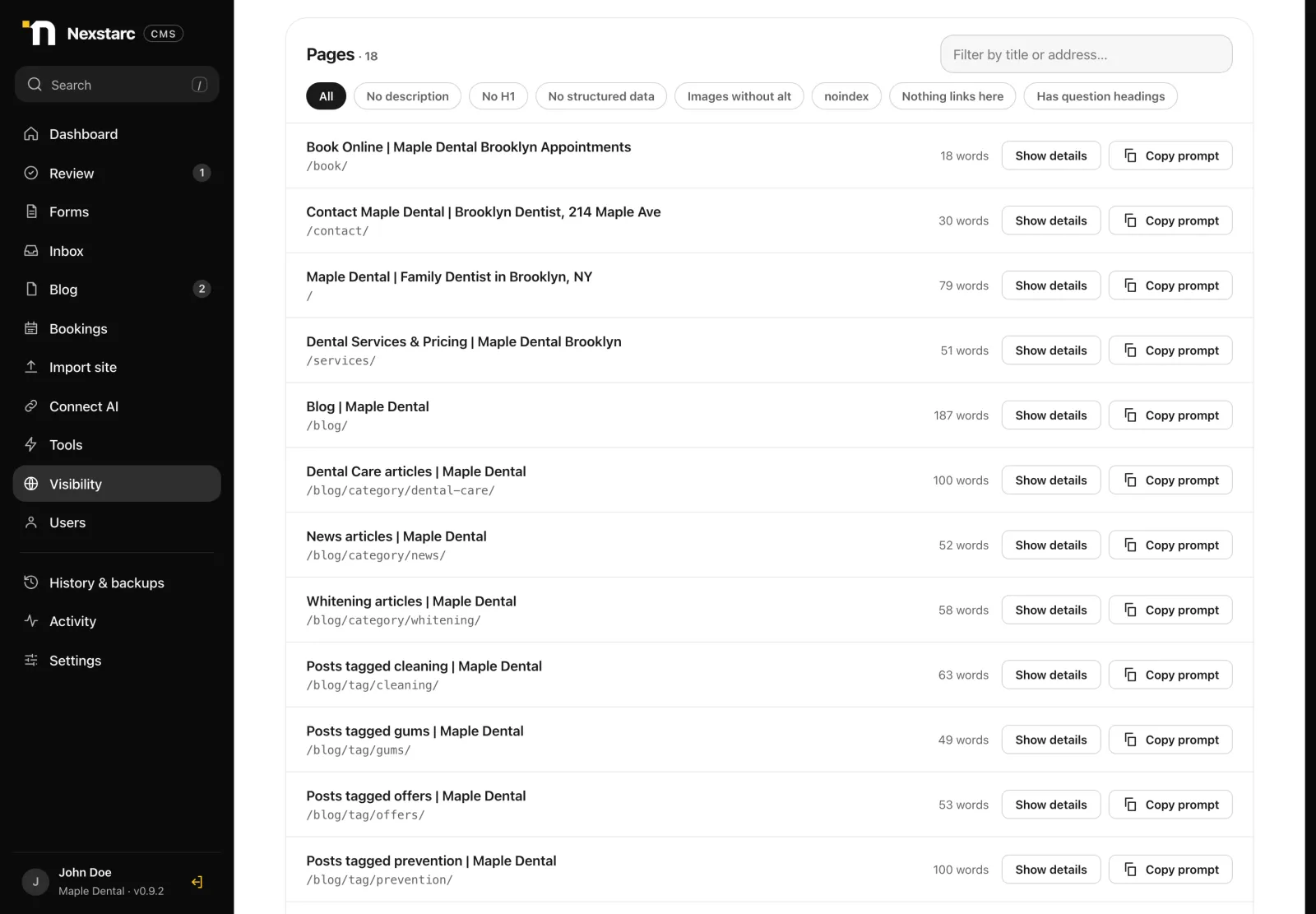
List of pages with Show details and Copy prompt buttons and filters such as no description or no H1
Page by page. Every page has Show details and a Copy prompt button. Paste the prompt into your AI to review the page and draft the fixes.
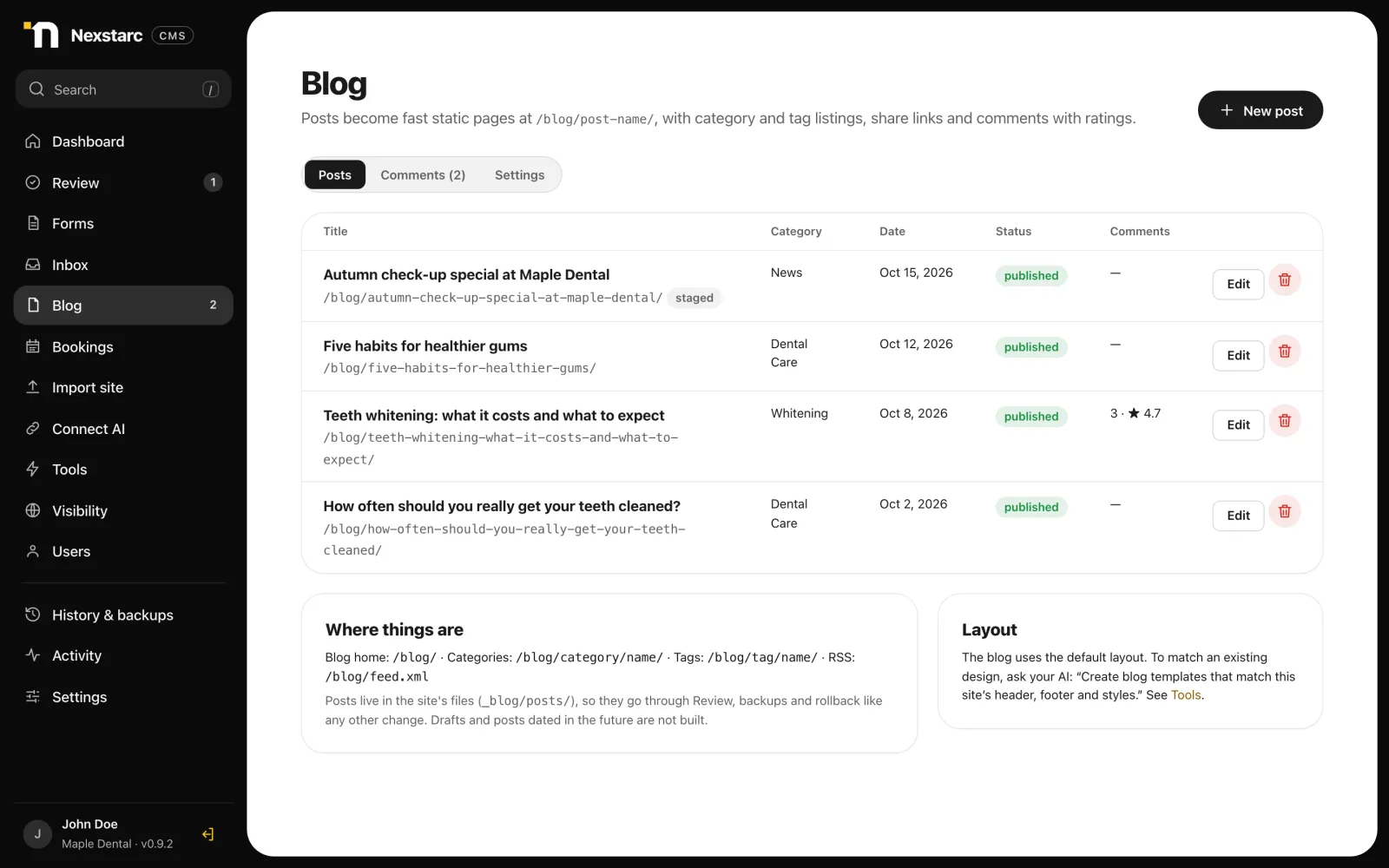
Blog posts list with categories, dates, status and comment totals
Blog. Write in Markdown or let your AI draft posts. Categories, tags, share buttons and an RSS feed are generated for you.
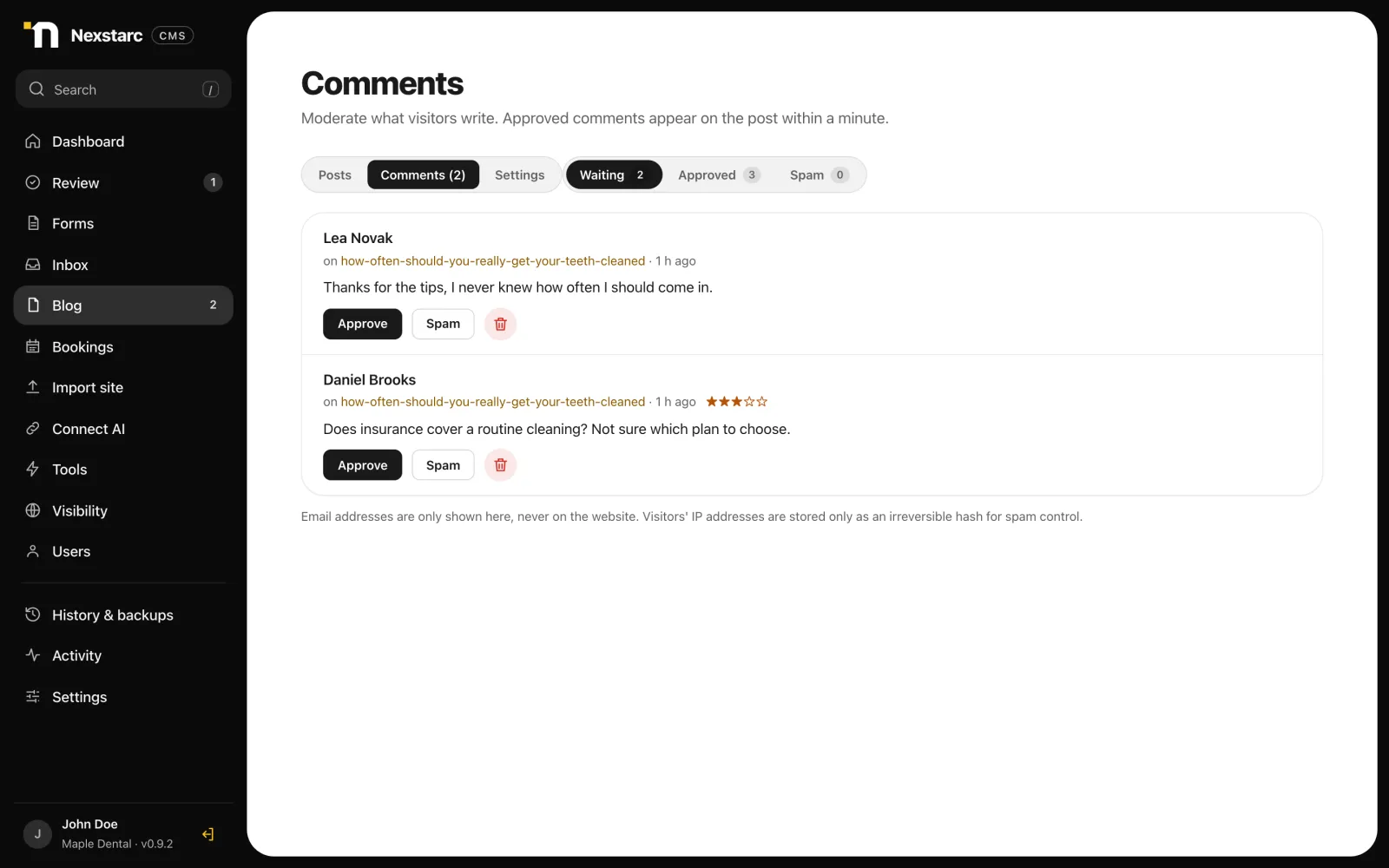
Comment moderation queue with approve and spam buttons
Comments and ratings. Visitors comment and rate. You approve, mark as spam, or delete. Emails are never shown on the site.
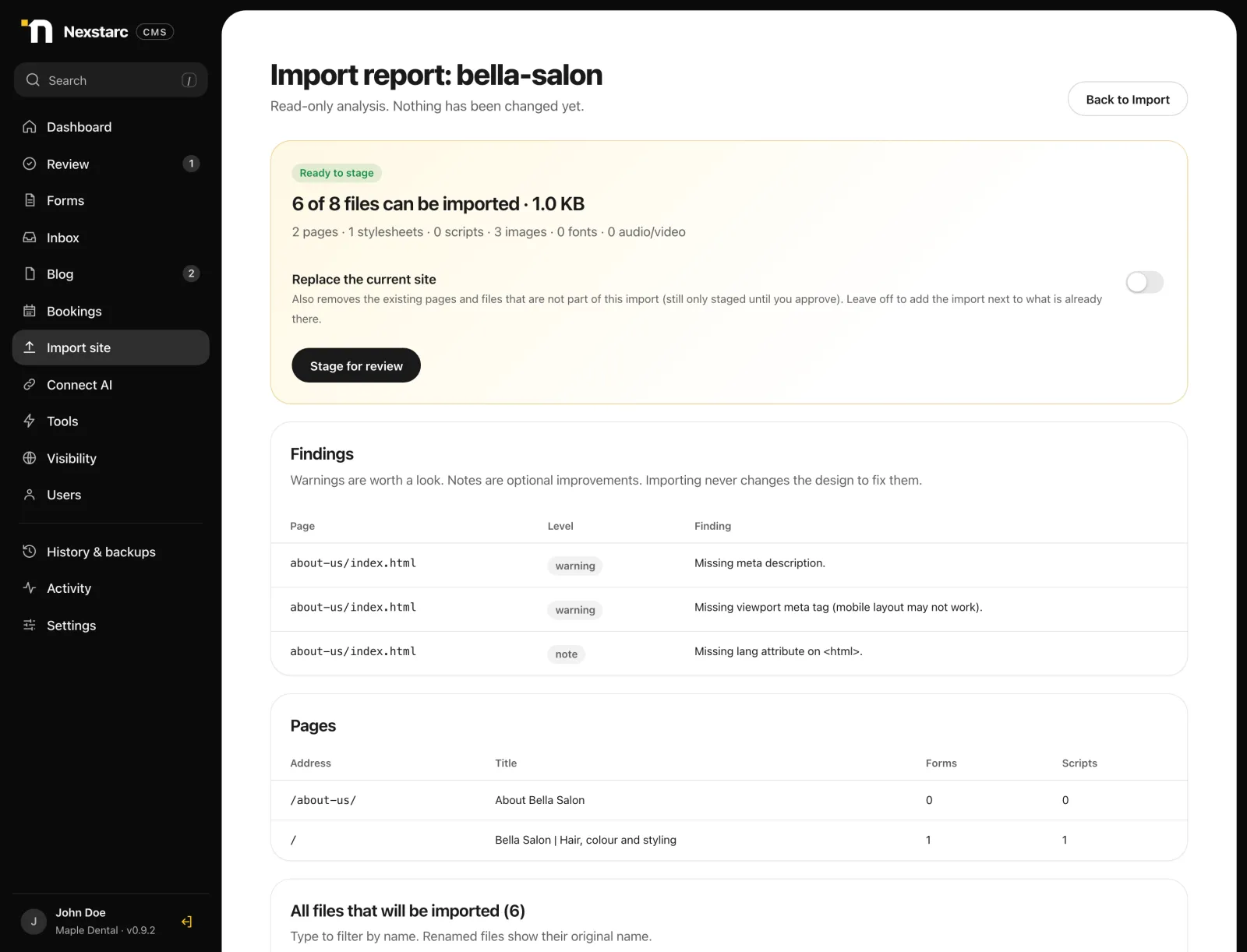
Import report for an existing website with findings, pages and forms
Import an existing site. A clear report first, then it is staged for review. The design stays exactly as it was uploaded.
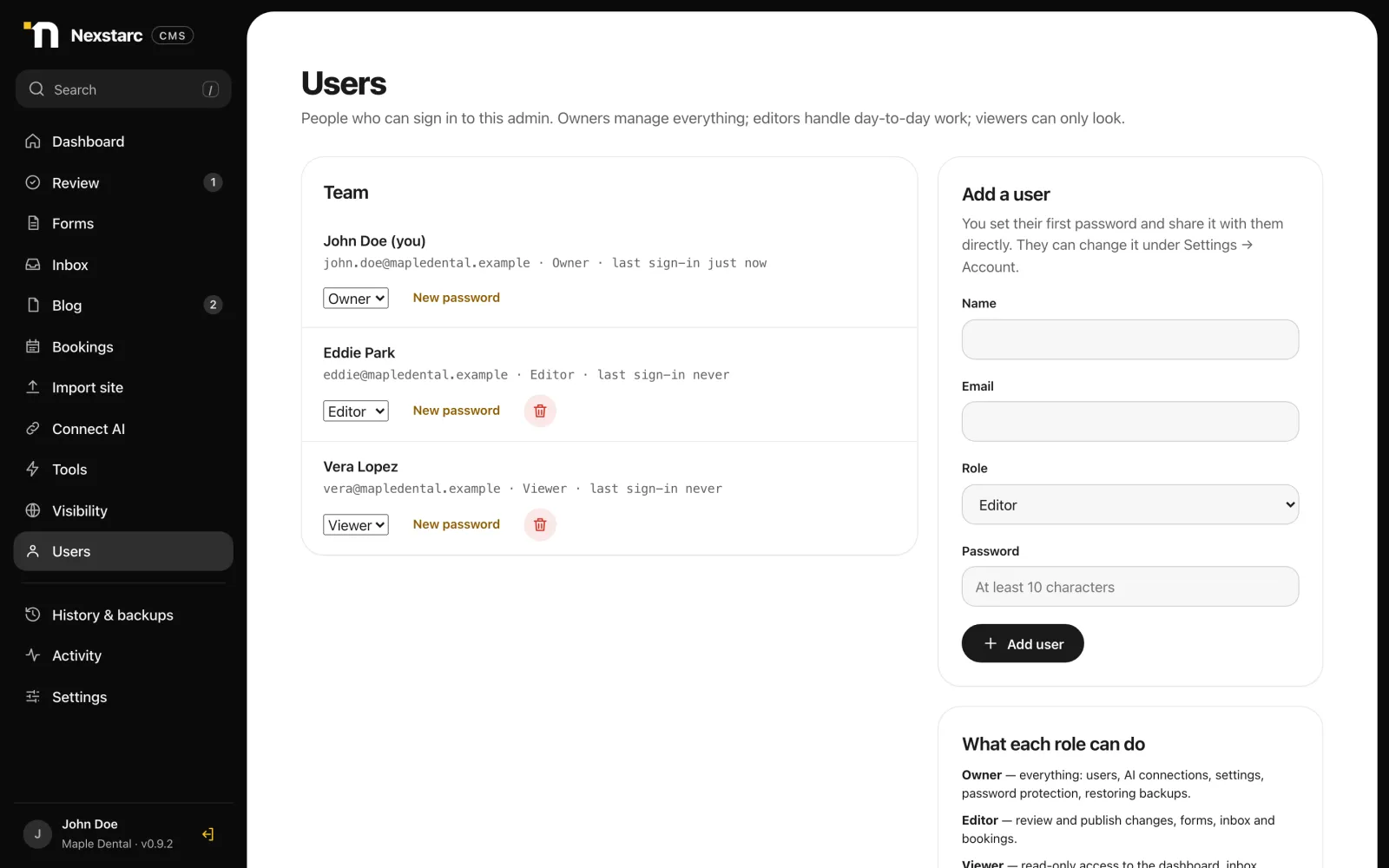
Users page with owner, editor and viewer roles
Users and roles. Give your team and clients the right access: owners manage, editors work, viewers look.
Who it is for

Two ways to put it to work

For agencies and freelancers

Deliver client sites faster, with the client in control

  • Let your AI build and update client sites while the client approves each change
  • Take over a client's existing HTML site without changing its design
  • Roles for your team and your clients, with a full activity trail
  • Forms, booking, blog and comments included, with no plugin stack to maintain
  • Backups and rollback protect you when a change goes wrong
Request agency access
For business owners

A fast website you can update by asking

  • Get a quick, clean site with online booking, a contact form and a blog
  • Change hours, prices or text by telling your AI, then approve the result
  • Nothing changes on your site without your say-so
  • Runs on your own hosting. No monthly platform lock-in
  • Prefer not to set it up yourself? Our studio can install and manage it for you
Request early access
Work with your AI agent

Just say what you want

Your AI picks the right tools, builds a draft, checks it, and sends it to you. You read a clear summary, preview the page, and decide.

Examples your AI can handle today: build a site, edit pages, add a blog post, set up booking, connect forms, import an existing site, check SEO and AI visibility, and restore an earlier version.

YouBuild a 5-page site for Maple Dental in Brooklyn. Calm teal, online booking and a contact form.
Your AIDone. I built 5 pages, set up booking with three services, and connected the contact form. All pages score 100 on the audit. Preview is ready.
YouAdd a blog post about whitening costs.
Your AIDrafted “Teeth whitening: what it costs and what to expect” in the Whitening category. Ready for your review.
YouCheck the services page for SEO and AI visibility.
Your AIReviewed it. The title and description are fine, but there are no question-style headings and no structured data. I drafted fixes and kept the design the same. Ready for your review.
Be found

Be found by search engines and AI assistants

Nexstarc CMS measures the facts about every page. Your AI reads them, tells you what to fix, and stages the fixes as a draft you approve.

  • Facts, not scores.For every page: title and description, headings, question headings with their answers, structured data, links, sources, and the text a crawler can read without JavaScript.
  • AI crawler access at a glance.See which crawlers your robots.txt allows, including GPTBot, ClaudeBot, PerplexityBot, Google-Extended and Googlebot, plus llms.txt, your sitemap and duplicate titles.
  • A ready prompt for every page.Press Copy prompt and paste it into your AI. It reads the facts, explains what is weak, and drafts the fixes without touching your design.
  • See it before it ships.Previews show how a page can look as a Google result on desktop and mobile, and as a Facebook, LinkedIn or X card.

An honest note. It reports facts and suggests fixes. It cannot promise rankings, or that an AI assistant will mention your business. Nothing changes on your site until you approve it.
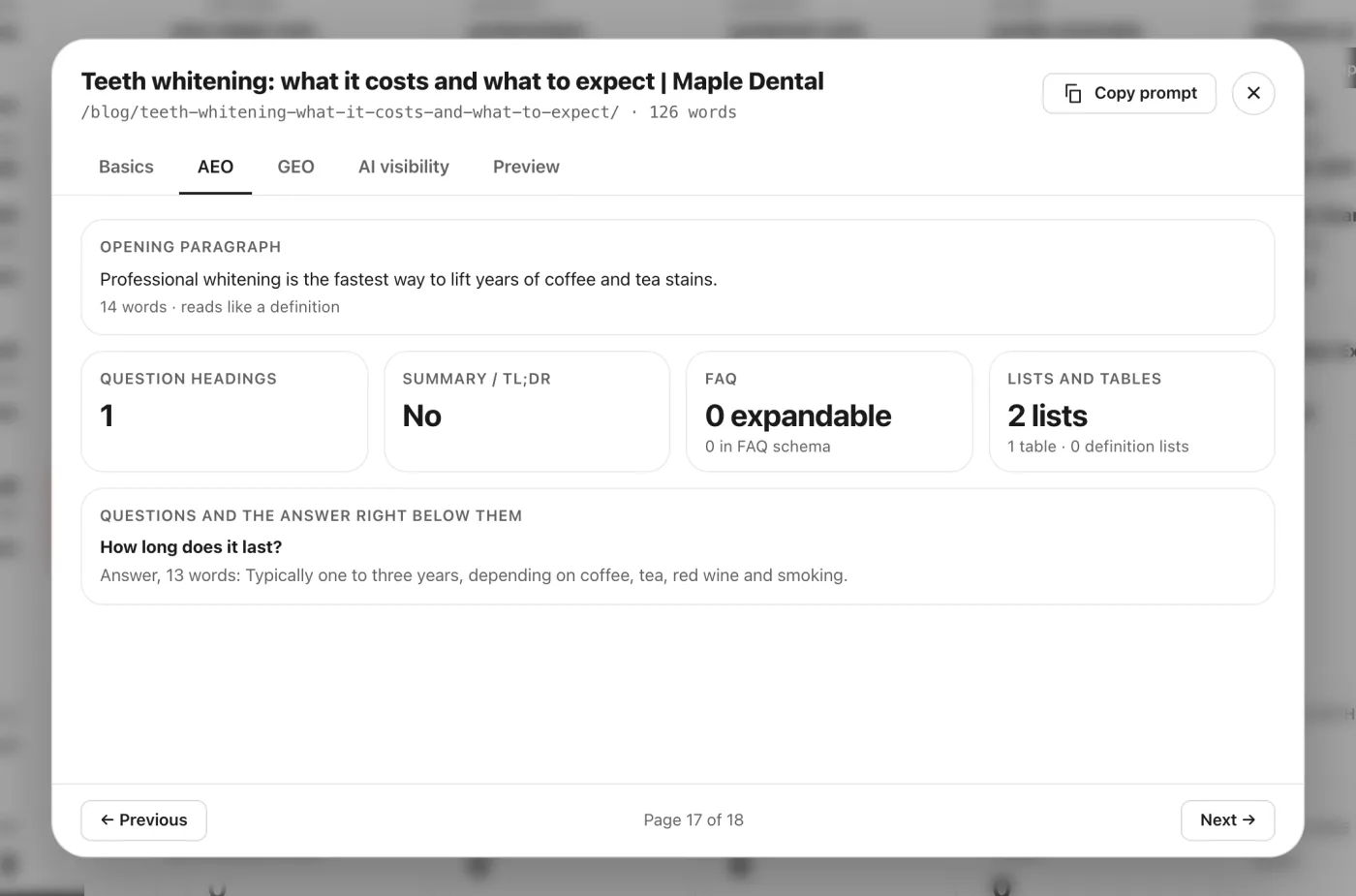
Details for one page showing the opening paragraph, question headings and the answer written below them

Answer-engine facts for one page: the opening paragraph, and each question heading with the answer written right below it.
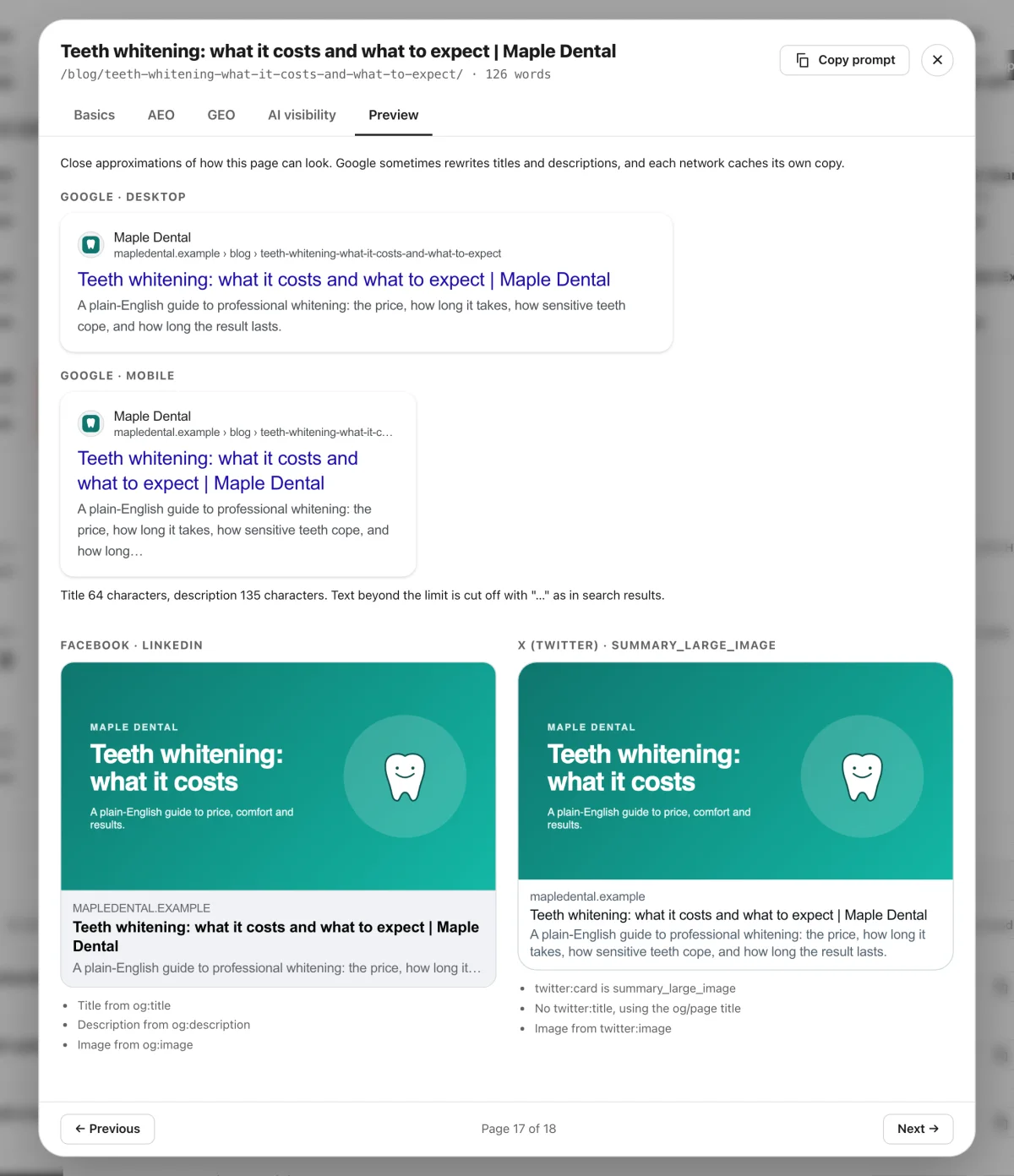
Preview of one page as a Google result on desktop and mobile and as Facebook and X share cards

Preview: the same page as a Google result and as a share card.

What it builds

Fast, clean sites with booking, blog and comments

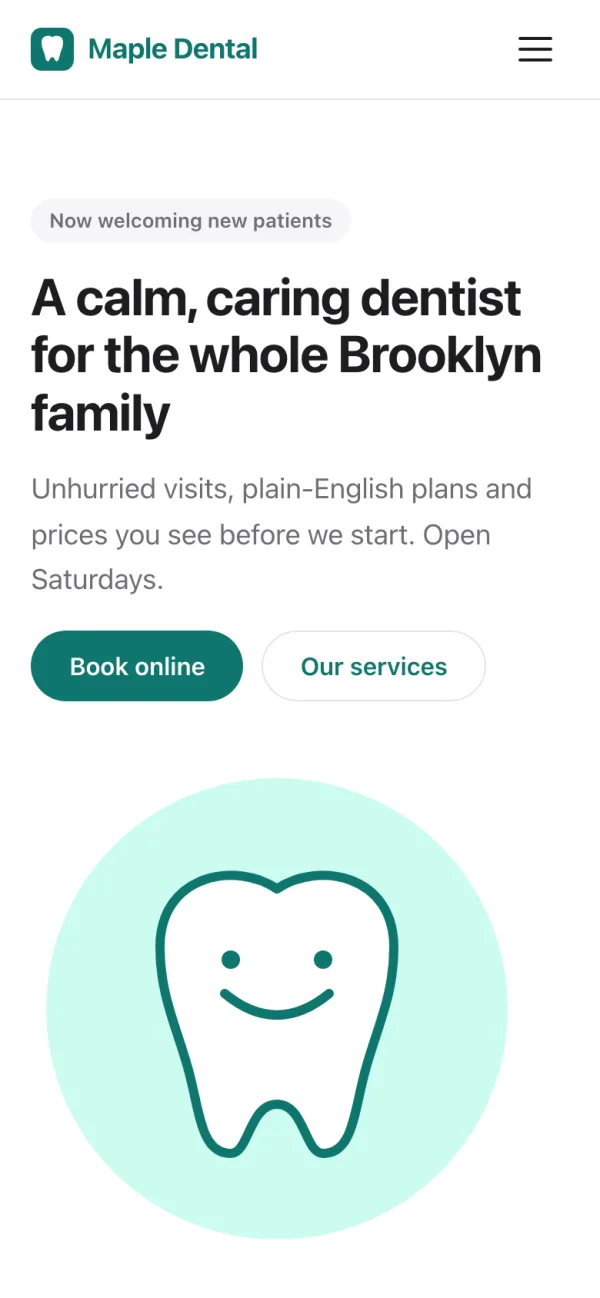
A demo clinic site built and managed entirely through Nexstarc CMS. Pages are plain HTML, mobile first, and scored by the built-in audit.
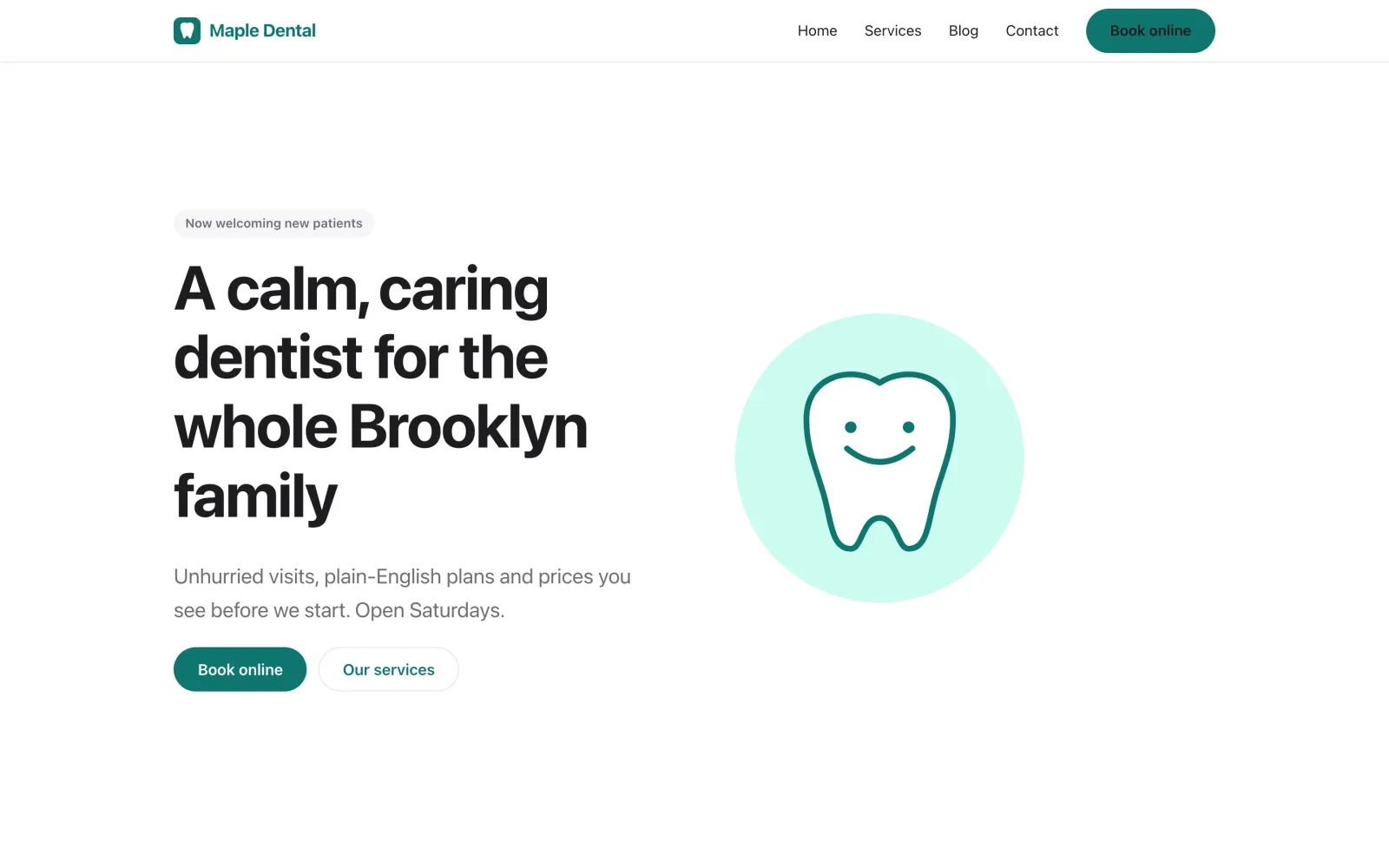
Demo clinic website home page on desktop
Home page on desktop
The same demo website on a phone
The same page on mobile
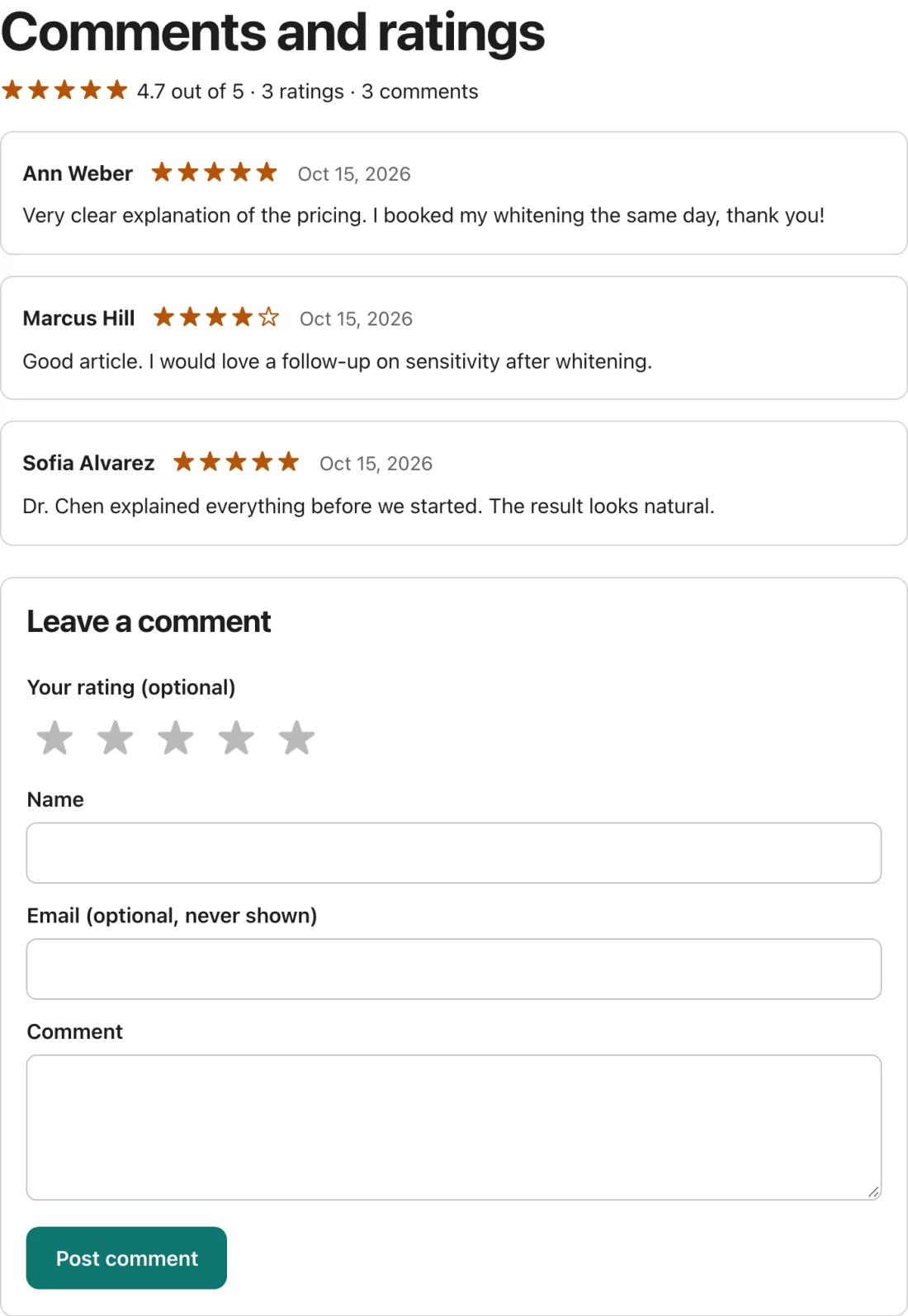
Comments and ratings widget on a blog post showing 4.7 out of 5 from 3 ratings
Comments and star ratings on a blog post
Safe by design

How every change reaches your site

The AI can only write web files into a draft. It cannot write server code, and it cannot publish unless you allow it.

Your AI draftsPages, posts, forms and settings are staged, never live.
Audit runsSpeed and SEO are scored, with fixes if needed.
You previewSee the real result on desktop, tablet and phone.
You approveOne click to publish, or ask for changes.
Backed upA restore point is saved. Roll back any time.
An honest comparison

Where it fits, and where it does not

A general guide, not a claim about any one product. Features vary by plan and plugin.

Nexstarc CMSWordPress with AI pluginsHosted site builders
Your AI can operate it end to endYes, built for itPartly, through pluginsPartly, built-in assistants
Owner approval before anything goes liveBuilt inDepends on pluginsDepends on the plan
Visitors get static pagesYesNo, PHP and database on each viewVaries
Runs on your own hostingYesYesNo, hosted by the platform
Bring in an existing HTML site unchangedYesManual workRarely
Online shop with checkoutNot yetYes, with pluginsYes
Large plugin and theme ecosystemNoYesApp stores

Good to know: member logins, custom web apps and framework exports (such as Next.js) are not supported today. Nexstarc CMS focuses on fast, content-led business sites.

Good to know

Runs on ordinary hosting

Most shared hosting plans with cPanel are enough. We test on real hosts, and the installer checks yours before it installs anything.

  • PHP 8.1 or newer
    With the usual extensions. The installer lists what it finds.
  • MySQL, MariaDB or SQLite
    Create a database in your hosting panel, or use SQLite with no setup.
  • Apache-style hosting with .htaccess
    Standard on cPanel, LiteSpeed and most shared hosts.
  • Private beta
    We are onboarding a small number of agencies and businesses, and we help you set up.
Questions

Frequently asked questions

What is Nexstarc CMS?

It is a content management system built so an AI agent can operate it. Your agent builds and edits the site as plain HTML files. You preview every change and approve it before it goes live.

Do I need technical skills?

No developer is needed to get started. You upload one folder, run a guided installer, then paste one command into your AI app. After that you work in plain words. Our studio can also install and manage it for you.

Which AI can I use?

Any AI app that supports the open MCP standard, such as Claude, Codex and Cursor. You connect it once, and you can use more than one.

Can the AI publish without my approval?

Not unless you allow it. By default the AI can only stage drafts, and you approve each change in the admin. Publishing rights are a switch on each AI connection, and every publish is backed up.

Where does my website live?

On your own hosting and domain. Nexstarc CMS installs in a folder next to your site and publishes static pages into it. If you prefer, we can host and set it up for you.

Can I bring my existing website?

Yes. Upload the files or a ZIP and Nexstarc CMS shows a report first. It then stages the site for your review without changing the design. Only file names that cannot be published are adjusted, and links to them are updated.

How fast will my site be?

Sites built for it are plain HTML with no database on page views, and each page is audited for speed and SEO before you publish. Imported sites keep their original design, so their scores depend on how they were built. Real results also depend on your hosting and content.

Will Google, ChatGPT and other AI assistants find my site?

No tool can honestly promise rankings or mentions. Nexstarc CMS shows you the facts those systems read: titles, descriptions, headings, structured data, which AI crawlers your robots.txt allows, your sitemap and llms.txt. Your AI explains what is weak and drafts fixes, and you approve them. Pages are plain, fast HTML, which also helps crawlers read them.

Is it safe?

The AI can only write web files into a draft. It cannot write server code or publish unless you allow it. Changes are backed up, roles limit who can do what, and form and comment input is treated as untrusted. As with any software, keep your hosting updated.

What can it not do yet?

Online shops with checkout, member logins and custom web apps are not supported, and sites exported from frameworks such as Next.js need to be exported as plain HTML first.

Which hosting do I need?

Ordinary web hosting is enough: PHP 8.1 or newer, MySQL, MariaDB or SQLite, and Apache-style hosting with .htaccess, as on cPanel and LiteSpeed. The installer checks your server before it installs anything.

What does it cost?

We are in a private beta. Early-access pricing is agreed with each team, so tell us about your project in the form below.

Early access

Get Nexstarc CMS for your next project

Tell us a little about what you want to build. We will reply with next steps and, if it is a fit, set you up for the private beta.

  1. 1  Install your server
  2. 2  Sign up
  3. 3  Connect your AI
  4. 4  Work with your AI agent

We use your details only to reply about Nexstarc CMS. We never share them.

Ready when you are

Let your AI build the website, with you in charge.